⚡
Kill the busywork
Generate dozens or hundreds of versions at once. No more duplicating comps and retyping text row by row.
Adobe After Effects plug-in
sheet2comp turns a spreadsheet into finished, versioned After Effects comps — filling text layers, swapping images, updating precomps, and queuing renders. One row in, one comp out. No scripting, no busywork.
Why sheet2comp
If you make the same comp over and over with different text, you are doing a spreadsheet's job. sheet2comp does it in one click.
Generate dozens or hundreds of versions at once. No more duplicating comps and retyping text row by row.
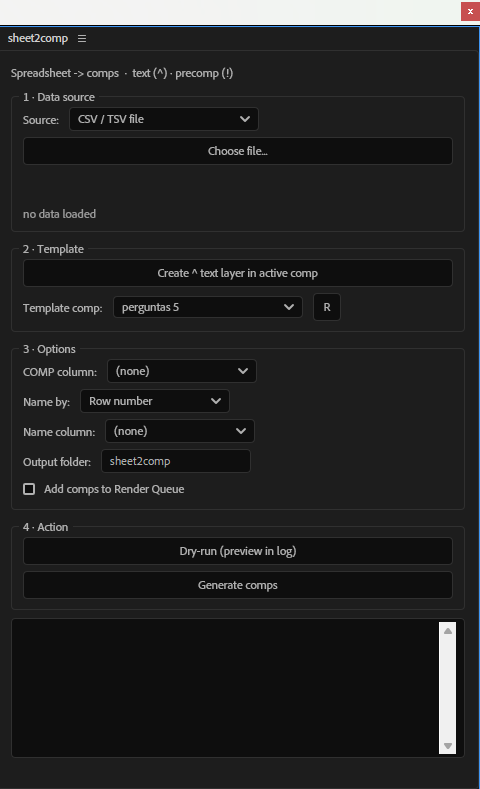
A clean dockable panel, a simple naming convention, and your data. If you can name a layer, you can automate it.
Every spreadsheet row becomes its own composition in a folder you name — ready to review or render.
Fills ^text layers, swaps >image slots, and recurses into !precomps — nested templates update per version.
CSV, TSV, Excel (.xlsx) or a live Google Sheets link. Delimiter auto-detected, UTF-8 safe for accented text.
Optionally push every generated comp straight to the After Effects Render Queue and walk away.
How it works
Prefix text layers with ^ and precomps with ! — e.g. ^title, !card. One-time setup per template.
Point sheet2comp at a CSV or Excel file, or paste a Google Sheets link. Columns are read automatically.
Columns auto-match layers by name. A dry-run prints exactly what will happen before anything is created.
Click once. sheet2comp builds a comp per row into your output folder — optionally queued to render.
Data sources
Comma, semicolon or tab — the delimiter is detected automatically. UTF-8 and BOM aware, with support for quoted fields and line breaks.
Read Excel workbooks directly, no export step. Powered by a bundled, offline spreadsheet engine — nothing leaves your machine.
Paste a shared link and pull the latest data live. Keep editing in the cloud; regenerate whenever the sheet changes.
Where you can use it
If it lives in rows and columns, sheet2comp can build it.
Pricing
Secure checkout on Gumroad. Instant download.
FAQ
An After Effects plug-in that turns a spreadsheet into finished compositions. For every row of data it duplicates a template comp and fills the tagged text layers — so you build dozens or hundreds of versions without duplicating and retyping by hand.
sheet2comp runs as a dockable ScriptUI panel and works with After Effects 2022 and later, on both Windows and macOS.
No. You tag text layers with a ^ prefix and precomps with a ! prefix, then point the panel at your data. If you can name a layer, you can automate it.
CSV or TSV files, Excel files (.xlsx, .xls), and live Google Sheets links. The delimiter is auto-detected and files are read as UTF-8, so accented characters stay intact.
Yes — Excel workbooks are read directly with a bundled offline engine. No export to CSV and nothing is uploaded anywhere.
Yes. Mark a layer as an image slot with the > prefix (e.g. >icon) and put an image path in that column. sheet2comp imports the file and swaps the layer's source per row — ideal for icons, product shots, avatars or weather graphics — auto-fit to the slot's size.
No. It duplicates your template into an output folder you choose and edits the copies, leaving the original untouched. Everything happens inside a single undo group.
Give the busywork to sheet2comp and get back to the motion.
Buy Now — $19.99